SageMaker Unified Studio Research Environment
This starter kit deploys a SageMaker Unified Studio (SMUS) environment for organizations with multiple research teams operating within a single AWS account. It provides a governed ML platform where teams can collaborate on data and ML projects through the SMUS portal, with centralized identity management via IAM Identity Center.
Use Cases
- Multi-team research environments with shared governance in a single account
- Self-service ML platform access via SageMaker Unified Studio portal
- Team-based project isolation with SSO group membership
- Data science experimentation with integrated data governance via DataZone
- Rapid onboarding of research teams with standardized project profiles
Capabilities
- SageMaker Unified Studio domain (DataZone V2) with SSO integration
- Project profiles for standardized team environments
- Team-based access control via IAM Identity Center groups
- Lake Formation governance for fine-grained data access
- Glue Catalog encryption for metadata security
- IAM roles for domain and data administration
Architecture
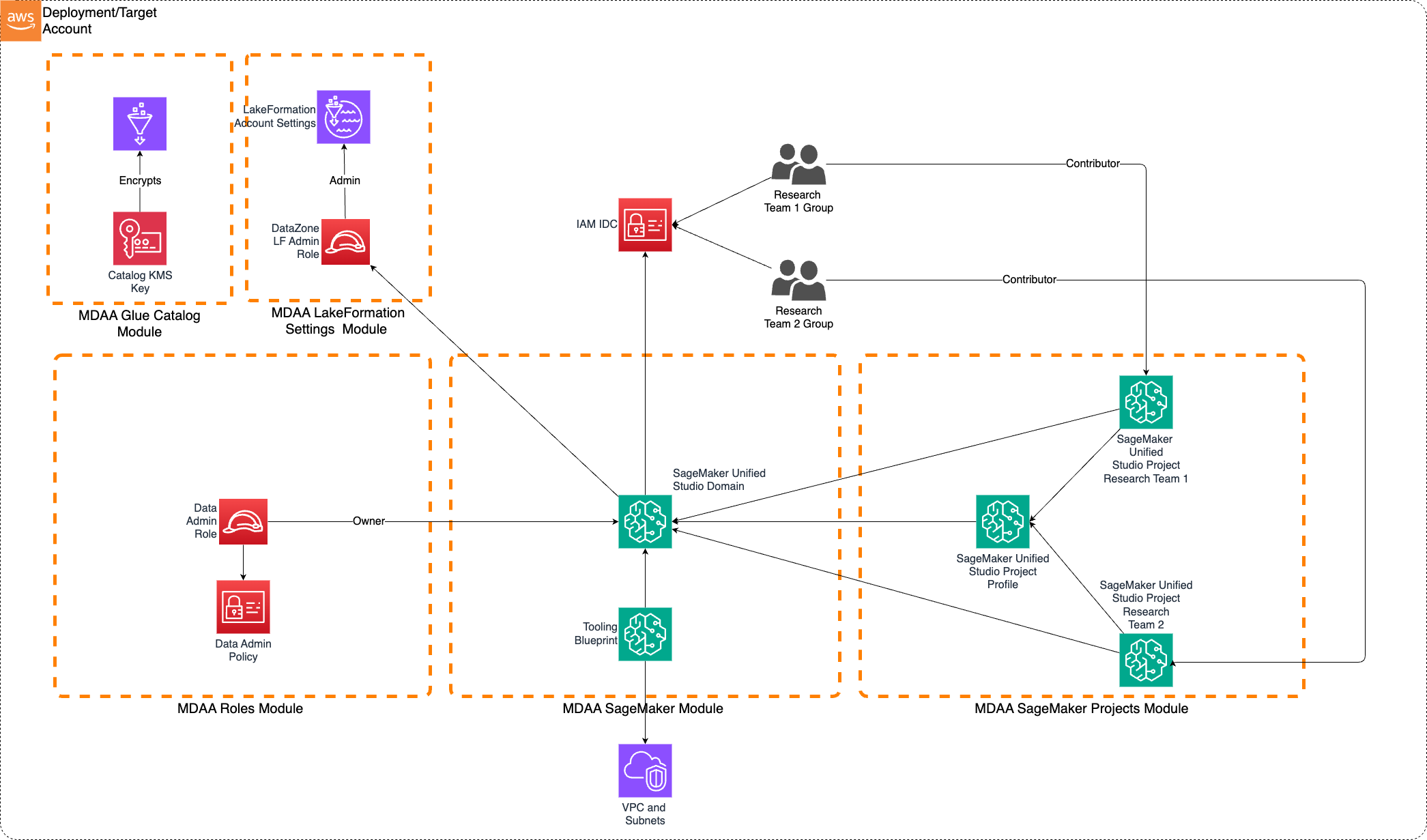
Deployment
Prerequisites and Predeployment
- Authenticate to your target AWS account and region. Ensure the authenticated role has permissions to deploy resources via CDK.
- Bootstrap CDK in your target account and region. The account should be part of an AWS Organization for full Identity Center support.
-
Enable IAM Identity Center in the deployment region and create SSO groups for team1 and team2.
⚠️ Standalone Account Limitation: If deploying to an account not part of an AWS Organization, you must deploy in the same region where IAM Identity Center is enabled. Deploying to a different region will fail with:
IDC not enabled (Service: DataZone, Status Code: 400). -
Provision a VPC with at least 2 private subnets. Subnets must have connectivity to AWS service endpoints, either via:
- NAT Gateway for outbound internet access, OR
- VPC Endpoints for:
- SageMaker API
- DataZone
- STS
- S3
- CloudWatch Logs
Additional info: PREDEPLOYMENT
Configure MDAA
-
Address all TODOs in
mdaa.yaml, specifically:- Set
organizationto a globally unique name - Set
contextvalues:team1-group-sso-id— SSO group name for team1team2-group-sso-id— SSO group name for team2vpc_id— VPC IDprivate_subnet_id1,private_subnet_id2— private subnet IDs with AWS service connectivity
- Set
-
Address all TODOs in module configs, specifically:
- CDK Nag suppressions in
shared/roles.yaml. Uncomment each suppression only after reviewing the associated permissions and confirming they are acceptable for your environment.
- CDK Nag suppressions in
Deploy MDAA
Run the following from the starter kit directory (containing mdaa.yaml):
-
Optionally, run
npx @aws-mdaa/cli lsto understand what stacks will be deployed. -
Optionally, run
npx @aws-mdaa/cli synthand review the produced templates. -
Run
npx @aws-mdaa/cli deployto deploy all modules in the order they appear in the config.
Additional info: DEPLOYMENT
Next Steps
See USAGE for post-deployment instructions.
Modules Deployed
| Module | Purpose |
|---|---|
@aws-mdaa/glue-catalog |
Glue Catalog KMS encryption (account-level) |
@aws-mdaa/roles |
IAM roles for data and domain administration |
@aws-mdaa/lakeformation-settings |
Lake Formation settings (account-level) |
@aws-mdaa/audit |
Encrypted S3 bucket and KMS key for CloudTrail audit log storage |
@aws-mdaa/audit-trail |
CloudTrail trail for S3 data events |
@aws-mdaa/sagemaker |
SMUS domain (DataZone V2) with SSO integration |
@aws-mdaa/sagemaker-project |
SMUS project profiles and team projects |
Troubleshooting
-
IDC not enablederror during deployment: IAM Identity Center must be enabled in the same region as your deployment. For standalone accounts, deploy in the region where Identity Center is enabled. Check your IDC region in the IAM Identity Center console. -
SSO users cannot access SMUS portal: Verify the SSO group IDs in
mdaa.yamlmatch the groups created in IAM Identity Center. Users must be members of the configured groups. -
Domain creation fails with PolicyGrant errors: Ensure you are authenticated with credentials derived from IAM Identity Center (not static IAM credentials). Use
aws configure ssoto set up SSO-based authentication. -
Lake Formation permission errors: Verify the Lake Formation admin roles are correctly configured in
shared/lakeformation-settings.yamland that the data-admin role has been granted LF admin permissions.