Minimal
This starter kit deploys the foundational governance layer required by all MDAA architectures: IAM roles, Glue Catalog encryption, and LakeFormation settings. Use this as a starting point when you want to build your own architecture from scratch.
Use Cases
- Starting a new MDAA project from scratch and adding modules incrementally
- Establishing governance foundations before deciding on a specific architecture
- Learning MDAA with the simplest possible deployment
Capabilities
- IAM role generation with CDK Nag compliance
- Glue Catalog KMS encryption (account-level)
- LakeFormation settings delegating access control to IAM (account-level)
- Resource tagging for cost allocation and operational governance
Architecture
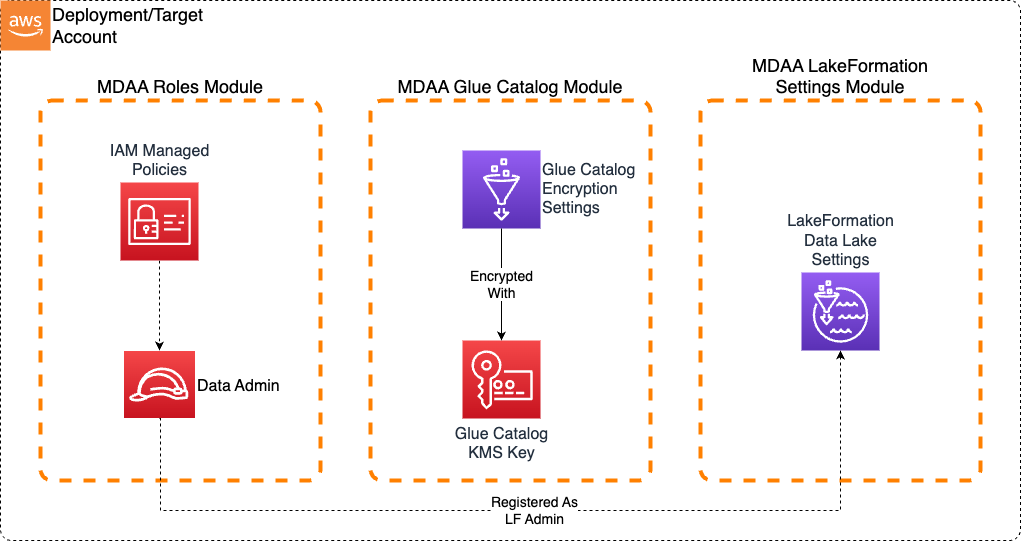
Deployment
Prerequisites and Predeployment
- Authenticate to your target AWS account and region. Ensure the authenticated role has permissions to deploy resources via CDK.
- Bootstrap CDK in your target account and region.
Additional info: PREDEPLOYMENT
Configure MDAA
-
Address all TODOs in
mdaa.yaml, specifically:- Set
organizationto a globally unique name
- Set
-
Address all TODOs in module configs, specifically:
- CDK Nag suppressions in
roles.yaml. Uncomment each suppression only after reviewing the associated permissions and confirming they are acceptable for your environment.
- CDK Nag suppressions in
Deploy MDAA
Run the following from the starter kit directory (containing mdaa.yaml):
-
Optionally, run
npx @aws-mdaa/cli lsto understand what stacks will be deployed. -
Optionally, run
npx @aws-mdaa/cli synthand review the produced templates. -
Run
npx @aws-mdaa/cli deployto deploy all modules.
Additional info: DEPLOYMENT
Next Steps
See USAGE.md for post-deployment verification and next steps.
Once deployed, extend your architecture by adding modules from the available modules catalog. Common next steps:
- Add
@aws-mdaa/datalakefor S3 storage with encryption and access policies - Add
@aws-mdaa/athena-workgroupfor SQL querying - Add
@aws-mdaa/dataops-projectfor ETL pipeline infrastructure
Modules Deployed
| Module | Purpose |
|---|---|
@aws-mdaa/roles |
IAM roles and policies for the data environment |
@aws-mdaa/glue-catalog |
Glue Catalog KMS encryption (account-level) |
@aws-mdaa/lakeformation-settings |
LakeFormation IAM delegation (account-level) |
Troubleshooting
- LakeFormation settings conflict: If LakeFormation settings have already been configured in the account (manually or by another deployment), the
lakeformation-settingsmodule may fail. Remove existing LakeFormation data lake administrators via the AWS Console before deploying.