Lakehouse Analytics
A complete analytics lakehouse on AWS — S3 data lake, Glue cataloguing and ETL, data quality enforcement, Athena and Redshift querying, and QuickSight BI — deployable end-to-end with a single npx @aws-mdaa/cli deploy.
Use Cases
- Data needs to flow through ingestion, processing, quality validation, and consumption layers.
- Analytics are consumed via Athena, Redshift, and QuickSight.
- Data quality enforcement and ETL workflows are required.
- Fine-grained access controls and governance are needed.
- You want a validated, end-to-end reference covering all six DIW Data Foundations capabilities (Ingestion/Storage, Cataloguing, Processing, Querying, Warehousing, Consumption/BI) plus Governance.
Capabilities
- Storage — S3 data lake with
rawandtransformedbuckets, KMS-encrypted, with coarse-grained access via bucket policies. - Cataloguing — KMS-encrypted Glue Data Catalog, Lake Formation settings, a DataOps project with a sample Glue database, and a Glue crawler.
- Processing — Glue ETL job (sample PySpark script) plus a Glue Data Quality ruleset, DQ evaluation job, and a workflow that runs DQ after the crawler.
- Querying — Athena workgroup over the data lake.
- Warehousing — Redshift cluster (multi-AZ, cross-region snapshot copy).
- Consumption/BI — QuickSight account, VPC connection, and data sources for both Athena and Redshift.
- Governance — IAM roles (
data-admin,data-user,glue-etl), an S3 audit bucket, and a CloudTrail audit trail.
Architecture
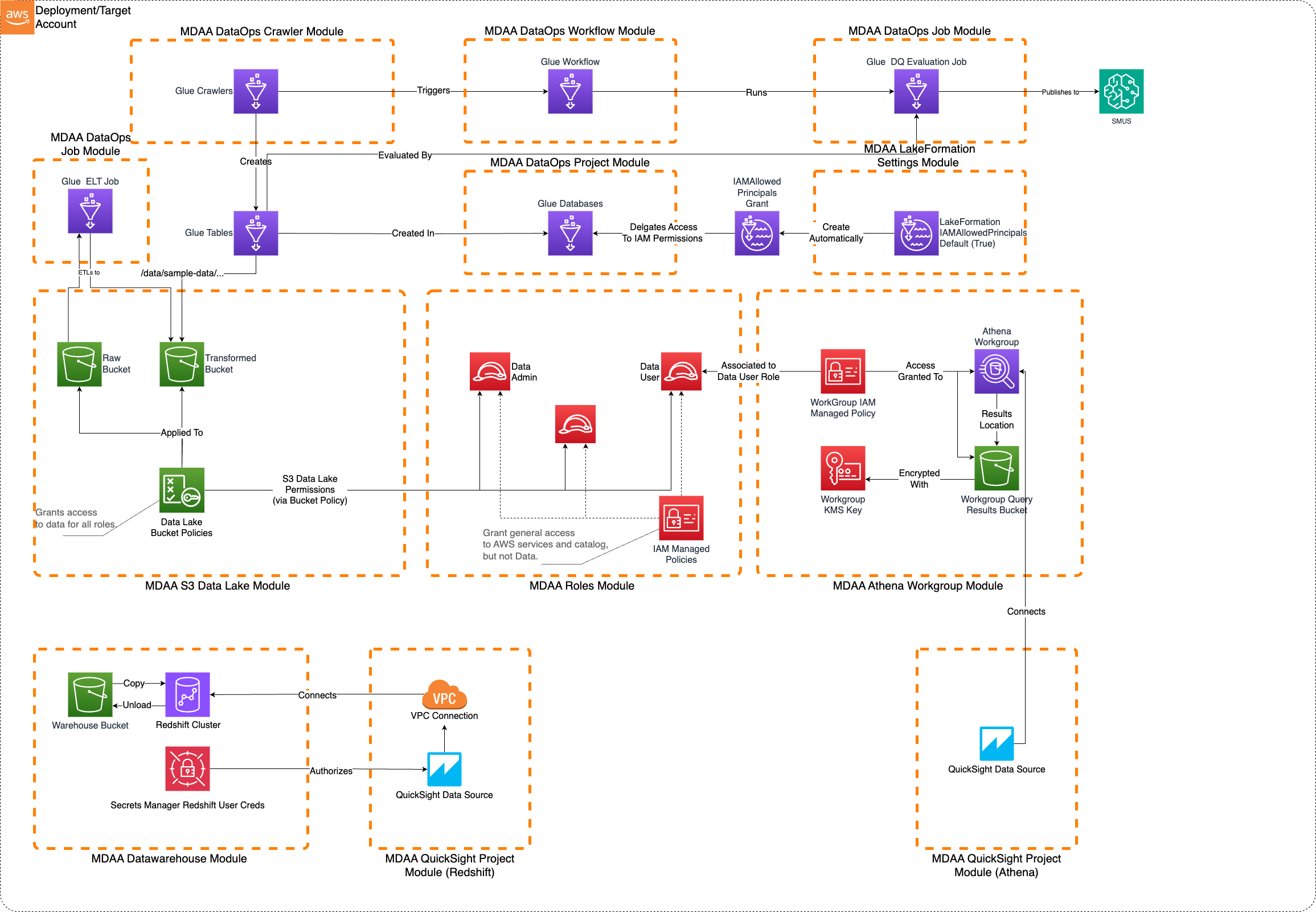
Deployment
Prerequisites and Predeployment
- Authenticate to your target AWS account and region. Ensure the authenticated role has permissions to deploy resources via CDK.
- Bootstrap CDK in your target account and region.
- Provision a VPC with at least 3 subnets across 3 Availability Zones (required for Redshift multi-AZ and the QuickSight VPC connection).
Additional info: PREDEPLOYMENT
Configure MDAA
-
Address all TODOs in
mdaa.yaml, specifically:- Set
organizationto a globally unique name (used in the naming of all deployed resources, some of which are globally named such as S3 buckets). - Set the
contextvalues for your environment:vpc_id,subnet_id_1,subnet_id_2,subnet_id_3,notification_email,vpc_cidr,backup_region,qs_identity_region. - Optionally override
qs_readers_groupandqs_authors_group, which default toreadersandauthors. - Optionally set
permissions_boundary_nameto apply an IAM permissions boundary to all roles. - Optionally comment out the
glue-catalogmodule if another MDAA deployment already manages the account-level Glue Catalog encryption.
- Set
-
Address all TODOs in module configs, specifically:
- CDK Nag suppressions in
governance/roles.yaml. Uncomment each suppression only after reviewing the associated permissions and confirming they are acceptable for your environment.
- CDK Nag suppressions in
Deploy MDAA
Run the following from the starter kit directory (containing mdaa.yaml):
- Optionally, run
npx @aws-mdaa/cli lsto understand what stacks will be deployed. - Optionally, run
npx @aws-mdaa/cli synthand review the produced templates. - Run
npx @aws-mdaa/cli deployto deploy all modules. The default path uses IAM-based authentication for the QuickSight Redshift data source and requires no manual console steps.
Additional info: DEPLOYMENT
Next Steps
After deploying, see USAGE.md for what got deployed, where to find it, how to add QuickSight users, and how to load sample data and run the pipeline.
Modules Deployed
| Module | Purpose |
|---|---|
quicksight-account |
Provisions the QuickSight account, resource-access service role, VPC connection security group, and the readers/authors groups. Deployed first so the service role exists before later modules reference it. |
roles |
Creates the data-admin, data-user, and glue-etl IAM roles with least-privilege policies. |
datalake |
Deploys the KMS-encrypted raw and transformed S3 buckets and bucket policies. |
glue-catalog |
Enforces KMS encryption on the account-level Glue Data Catalog. |
lakeformation-settings |
Configures Lake Formation administration mode and IAM-allowed-principals default for new databases/tables. |
athena |
Creates an Athena workgroup for querying the data lake. |
redshift |
Deploys a multi-AZ Redshift cluster with cross-region snapshot copy. |
audit |
Creates a secure S3 bucket for use as a CloudTrail / S3 Inventory target. |
audit-trail |
Creates a secure S3-based CloudTrail audit trail. |
example-project |
Creates a DataOps project with a sample Glue database and Lake Formation grants. |
example-crawler |
Creates a Glue crawler that catalogs the sample data in the transformed bucket. |
example-data-quality |
Creates Glue Data Quality rulesets for validating data completeness and integrity. |
etl-job |
Deploys a Glue ETL job for data transformation (sample PySpark script). |
dq-job |
Deploys a Glue DQ evaluation job using the bundled dq-main.py script. |
dq-workflow |
Creates a Glue workflow that triggers the DQ job after the crawler completes. |
quicksight-athena |
Creates a QuickSight data source over the Athena workgroup and attaches the matching S3/KMS grants to the QuickSight resource-access role. |
sg-rules |
Wires the QuickSight↔Redshift security group connectivity (@aws-mdaa/ec2 module) by adding rules to the pre-existing QuickSight and Redshift security groups. |
quicksight-redshift |
Creates a QuickSight data source over the Redshift cluster. Reaches the cluster via the connectivity wired by sg-rules. |
Troubleshooting
QuickSight data sources do not appear in the console
The deploy creates the readers and authors QuickSight groups and grants them access, but it does not add any members — so the data sources are invisible until you join a group. Add your QuickSight user to a group (see USAGE.md). The data sources appear under Datasets → New dataset → FROM EXISTING DATA SOURCES, not as a browsable top-level page. Group membership can take a few minutes to propagate; if a data source still does not appear, refresh, or grant your user direct access via the data source's Share / permissions.
QuickSight identity region mismatch
QuickSight group and folder ARNs must use the identity region (where QuickSight was originally subscribed), set via qs_identity_region in mdaa.yaml. If this does not match where QuickSight was subscribed, group and folder permissions fail silently.
Redshift data source transient error on first create
If the Redshift data source hits a transient error on first create, re-run the deploy once.
Using Secrets Manager authentication for the Redshift data source (two-pass deploy)
The default deploy uses IAM-based authentication and is fully automated. To use Secrets Manager authentication instead, a two-pass deploy is required because enabling QuickSight's access to Secrets Manager can only be done in the console (no API). The console can only manage the aws-quicksight-service-role-v0 role while it has no policies attached, so you deploy with the role bare, do the console enablement, then deploy the data sources.
-
In
governance/quicksight-account.yamlcomment outresourceAccessRolePermissions. Indata/redshift.yamluncommentdatabaseUsers. Inconsumption/quicksight-redshift.yamlcomment outiamParametersand uncommentsecretsManager. -
Deploy everything except the consumption data sources:
-
Open the QuickSight console AWS resources page (account name → Manage account → AWS resources, or Permissions → AWS resources in the left sidebar). On that page, enable Athena (choose Connect both and select the data lake and Athena results buckets), Redshift, and Secrets Manager (select the
serviceuserquicksightsecret). Resolve the bucket names from SSM: -
Deploy the consumption data sources: