Health Data Accelerator (HDA)
This HDA configuration illustrates how to create a healthcare datalake on AWS. Access to the data lake may be granted to IAM and federated principals, and is controlled on a coarse-grained basis only (using S3 bucket policies).
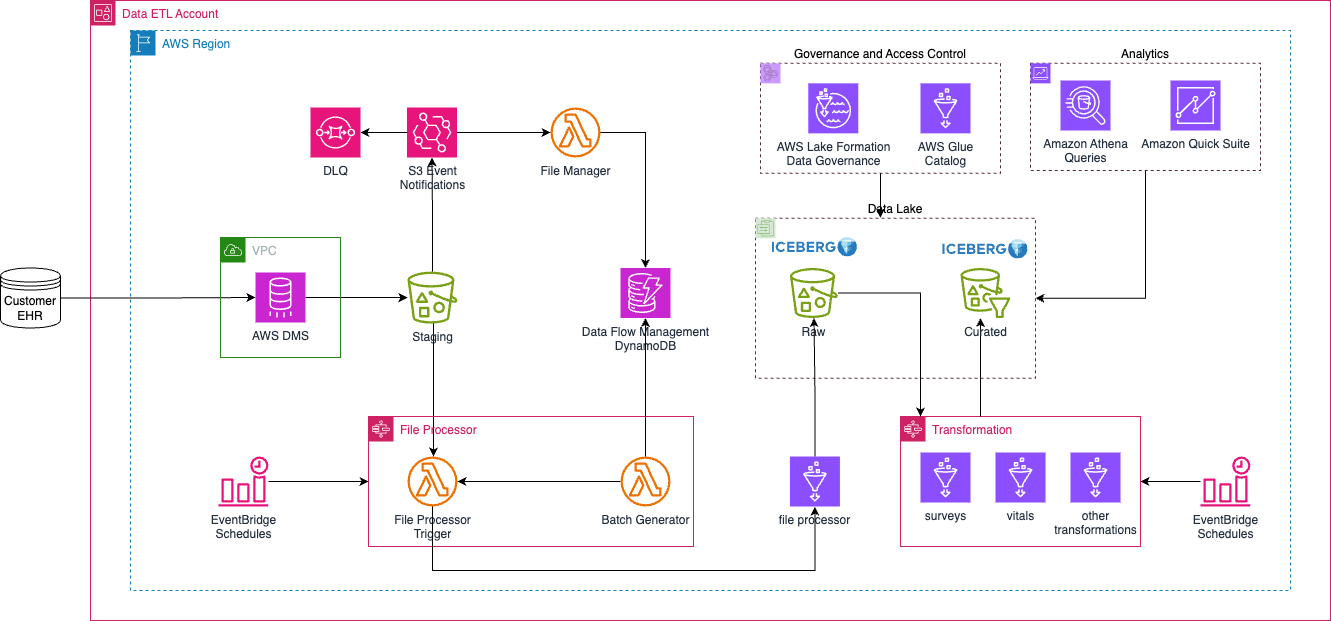
Deployment Instructions
Prerequisites
- Secrets Manager secret for storing the source database credentials.
- KMS key that this secret is using to encrypt the secrets.
- VPC for hosting the DMS task instances. For best practices on what VPC to deploy, consider using the Landing Zone Accelerator.
- The source database server must allow connection from DMS.
Update dataops/dms.yaml with information from items 1 to 3 from above.
The following instructions assume you have CDK bootstrapped your target account, and that the MDAA source repo is cloned locally. More predeployment info and procedures are available in PREDEPLOYMENT.
-
Deploy the configurations into the specified directory structure (or obtain from the MDAA repo under
starter_kits/health_data_accelerator). -
Edit the
mdaa.yamlto specify an organization name. This must be a globally unique name, as it is used in the naming of all deployed resources, some of which are globally named (such as S3 buckets). -
Edit the
mdaa.yamlto specifycontext:values specific to your environment. All fields require a value in order for the deployment to succeed. -
Ensure you are authenticated to your target AWS account.
-
Optionally, run
<path_to_mdaa_repo>/bin/mdaa lsfrom the directory containingmdaa.yamlto understand what stacks will be deployed. -
Optionally, run
<path_to_mdaa_repo>/bin/mdaa synthfrom the directory containingmdaa.yamland review the produced templates. -
Run
<path_to_mdaa_repo>/bin/mdaa deployfrom the directory containingmdaa.yamlto deploy all modules.
Additional MDAA deployment commands/procedures can be reviewed in DEPLOYMENT.
Configurations
The configurations for this architecture are provided below. They are also available under starter_kits/health_data_accelerator within the MDAA repo.
Config Directory Structure
health_data_accelerator
├── README.md
├── datalake
│         ├── athena.yaml
│         ├── datalake.yaml
│         └── lakeformation-settings.yaml
├── dataops
│         ├── crawler.yaml
│         ├── dms-shared.yaml
│         ├── dms.yaml
│         ├── dynamodb.yaml
│         ├── jobs.yaml
│         ├── lambda.yaml
│         ├── mappings
│         │         ├── example_table_mappings.yaml
│         │         ├── orgs_table_mappings.yaml
│         │         ├── patients_mappings.yaml
│         │         ├── surveys_table_mappings.yaml
│         │         └── vitals_table_mappings.yaml
│         ├── package.json
│         ├── project.yaml
│         ├── python-tests
│         │         ├── conftest.py
│         │         ├── pytest.ini
│         │         ├── pyproject.toml
│         │         ├── test_file_manager_simple.py
│         │         └── test_setup.py
│         ├── roles.yaml
│         ├── scripts
│         │         ├── load_batch_config.sh
│         │         ├── load_table_info.sh
│         │         └── table_config.json
│         ├── src
│         │         ├── glue
│         │         │         ├── file_processor
│         │         │         │         └── odpf_file_processor.py
│         │         │         └── transformation
│         │         │             ├── surveys_transformation_job.py
│         │         │             └── vitals_transformation_job.py
│         │         └── lambda
│         │             ├── file_manager
│         │             │         └── odpf_file_manager.py
│         │             └── file_processor
│         │                 ├── odpf_batch_generator_lambda.py
│         │                 └── odpf_file_processor_trigger_lambda.py
│         └── stepfunction.yaml
├── docs
│         ├── hda.drawio
│         └── hda.png
├── governance
│         ├── audit-trail.yaml
│         └── audit.yaml
├── mdaa.yaml
├── roles.yaml
└── tags.yaml
Post infrastructure deployment
Several Dynamodb tables need to be prepopulated. See the scripts. The shell scripts only work for this set of configurations. You should review the scripts carefully and make the relevant updates.
mdaa.yaml
This configuration specifies the global, domain, env, and module configurations required to configure and deploy this HDA architecture.
Note - Before deployment, populate the mdaa.yaml with appropriate organization and context values for your environment
# Contents available in mdaa.yaml
# All resources will be deployed to the default region specified in the environment or AWS configurations.
# Can optional specify a specific AWS Region Name.
region: default

# One or more tag files containing tags which will be applied to all deployed resources
tag_configs:
  - ./tags.yaml

## Pre-Deployment Instructions

# TODO: Set an appropriate, unique organization name
# Failure to do so may result in global naming conflicts.
organization: <unique-org-name>

# TODO: Set appropriate context values for your environment.
context:
  dms-source-db: <dms source relational db database name>
  dms-rds-secrets-arn: <arn of the AWS secrets manager secret containing RDS credentials for DMS>
  dms-rds-secrets-kms-arn: <arn of the KMS key to decrypt the above secret>
  vpc_id: <your vpc id>
  subnet_id1: <your subnet id1>
  subnet_id2: <your subnet id2>
  file_processor_event_bridge_trigger_hour: <file processor triggered every these hours>
  file_processor_event_bridge_trigger_rate: <file processor processing these many days>
  transformation_event_bridge_trigger_rate: <transformation processing these many days>
  transformation_event_bridge_trigger_hour: <transformation triggered every these hours>

# One or more domains may be specified. Domain name will be incorporated by default naming implementation
# to prefix all resource names.
domains:
  # The named of the domain. In this case, we are building a 'shared' domain.
  shared:
    # One or more environments may be specified, typically along the lines of 'dev', 'test', and/or 'prod'
    environments:
      # The environment name will be incorporated into resource name by the default naming implementation.
      dev:
        # The target deployment account can be specified per environment.
        # If 'default' or not specified, the account configured in the environment will be assumed.
        account: default
        # The list of modules which will be deployed. A module points to a specific MDAA CDK App, and
        # specifies a deployment configuration file if required.
        modules:
          # This module will create all the roles required for the datalake, as well as dataops layers running on top
          roles: # The module name (ie 'roles') will be incorporated into resource name by the default naming implementation.
            module_path: "@aws-mdaa/roles"
            module_configs:
              - ./roles.yaml

          # This module will deploy the S3 data lake buckets.
          # Coarse grained access may be granted directly to S3 for certain roles.
          datalake:
            module_path: "@aws-mdaa/datalake"
            module_configs:
              - ./datalake/datalake.yaml

          # This module will ensure that LakeFormation is configured to
          # automatically generate IAMAllowedPrincipal grants on new databases and tables.
          # This effectively delegates all Glue resource access controls
          # to IAM.
          # NOTE: Account-level module — can only be deployed once per AWS account.
          lakeformation-settings:
            module_path: "@aws-mdaa/lakeformation-settings"
            module_configs:
              - ./datalake/lakeformation-settings.yaml

          # This module will create an Athena Workgroup which can be used to query
          # the data lake.
          athena:
            module_path: "@aws-mdaa/athena-workgroup"
            module_configs:
              - ./datalake/athena.yaml

          # This module will create a secure S3-based bucket for use as a Cloudtrail Inventory target.
          audit:
            module_path: "@aws-mdaa/audit"
            module_configs:
              - ./governance/audit.yaml

          # This module will create a secure S3-based Audit Trail.
          audit-trail:
            module_path: "@aws-mdaa/audit-trail"
            module_configs:
              - ./governance/audit-trail.yaml

          # This module will ensure the Glue Catalog is KMS encrypted.
          # NOTE: Account-level module — can only be deployed once per AWS account.
          glue-catalog:
            module_path: "@aws-mdaa/glue-catalog"

  # The named of the domain. In this case, we are building a 'dataops' domain.
  dataops:
    # One or more environments may be specified, typically along the lines of 'dev', 'test', and/or 'prod'
    environments:
      # The environment name will be incorporated into resource name by the default naming implementation.
      dev:
        # The target deployment account can be specified per environment.
        # If 'default' or not specified, the account configured in the environment will be assumed.
        account: default
        # The list of modules which will be deployed. A module points to a specific MDAA CDK App, and
        # specifies a deployment configuration file if required.
        modules:
          # This module will create all the roles required for the datalake, as well as dataops layers running on top
          roles: # The module name (ie 'roles') will be incorporated into resource name by the default naming implementation.
            module_path: "@aws-mdaa/roles"
            module_configs:
              - ./dataops/roles.yaml

          # This module will create DataOps Project resources which can be shared
          # across multiple
          hda-project:
            module_path: "@aws-mdaa/dataops-project"
            module_configs:
              - ./dataops/project.yaml
          dynamodb-tables:
            module_path: "@aws-mdaa/dataops-dynamodb"
            module_configs:
              - ./dataops/dynamodb.yaml
          # This module will ensure the Glue Catalog is KMS encrypted.
          glue-jobs:
            module_path: "@aws-mdaa/dataops-job"
            module_configs:
              - ./dataops/jobs.yaml
          # file manager to manage data from the staging bucket
          hda-function:
            module_path: "@aws-mdaa/dataops-lambda"
            module_configs:
              - ./dataops/lambda.yaml
          file-workflow:
            module_path: "@aws-mdaa/dataops-stepfunction"
            module_configs:
              - ./dataops/stepfunction.yaml
            postdeploy:
              command: "./dataops/scripts/load_batch_config.sh"
              exit_if_fail: true
          # actions and resources created before other dms modules
          dms-shared:
            predeploy:
              command: "./dataops/scripts/load_table_info.sh table_config.json"
              exit_if_fail: true
            module_path: "@aws-mdaa/dataops-dms"
            module_configs:
              - ./dataops/dms-shared.yaml
          dms:
            module_path: "@aws-mdaa/dataops-dms"
            module_configs:
              - ./dataops/dms.yaml
tags.yaml
This configuration specifies the tags to be applied to all deployed resources.
roles.yaml
This configuration will be used by the MDAA Roles module to deploy IAM roles and Managed Policies required for this HDA architecture.
# Contents available in roles.yaml
generatePolicies:
  GlueJobLogPolicy:
    policyDocument:
      Statement:
        - SID: GlueCloudwatch
          Effect: Allow
          Resource:
            - "arn:{{partition}}:logs:{{region}}:{{account}}:log-group:/aws-glue/*"
          Action:
            - logs:CreateLogStream
            - logs:AssociateKmsKey
            - logs:CreateLogGroup
            - logs:PutLogEvents
    suppressions:
      - id: "AwsSolutions-IAM5"
        reason: "Glue log group name not known at deployment time."

  DataAdminPolicy:
    policyDocument:
      Statement:
        - Sid: BasicS3Access
          Effect: Allow
          Action:
            - s3:ListAllMyBuckets
            - s3:GetAccountPublicAccessBlock
            - s3:GetBucketPublicAccessBlock
            - s3:GetBucketPolicyStatus
            - s3:GetBucketAcl
            - s3:ListAccessPoints
            - s3:GetBucketLocation
          Resource: "*"

        # Allows basic listing of KMS keys (required for up)
        - Sid: BasicKMSAccess
          Effect: Allow
          Action:
            - kms:ListAliases
          Resource: "*"

    suppressions:
      - id: "AwsSolutions-IAM5"
        reason: "These actions do not accept a resource or resource name not known at deployment time."

  DataUserPolicy:
    policyDocument:
      Statement:
        # This statement allows coarse-grained access to Glue catalog resources, but does not itself grant any access to data.
        # Effective permissions are the intersection between IAM Glue Permissions and LF Grants. By establishing broad, coarse-grained permissions here,
        # we are effectively concentrating effective permissions management in LF Grants.
        - SID: GlueCoarseGrainedAccess
          Effect: Allow
          Resource:
            - arn:{{partition}}:glue:{{region}}:{{account}}:catalog
            - arn:{{partition}}:glue:{{region}}:{{account}}:database/*
            - arn:{{partition}}:glue:{{region}}:{{account}}:table/*
          Action:
            - glue:GetDatabase
            - glue:GetDatabases
            - glue:GetCatalogImportStatus
            - glue:GetTable
            - glue:GetTables
            - glue:GetPartition
            - glue:GetPartitions
            - glue:SearchTables

        # This statement allows the basic listing of Athena workgroups
        # Specific Athena accesses are granted by the Athena Workgroup module itself.
        - SID: BasicAthenaAccess
          Effect: Allow
          Action:
            - athena:ListWorkGroups
          Resource: "*"

    suppressions:
      - id: "AwsSolutions-IAM5"
        reason: "These actions do not accept a resource or resource name not known at deployment time."
  FileProcessorDdbPolicy:
    policyDocument:
      Statement:
        - SID: DynamoDBWriter
          Effect: Allow
          Resource:
            - "arn:{{partition}}:dynamodb:{{region}}:{{account}}:table/*"
          Action:
            - dynamodb:PutItem
            - dynamodb:DeleteItem
            - dynamodb:GetItem
            - dynamodb:Scan
            - dynamodb:Query
            - dynamodb:UpdateItem
    suppressions:
      - id: "AwsSolutions-IAM5"
        reason: "DDB table name not known at deployment time."

# The list of roles which will be generated
generateRoles:
  transformation-glue-job-role:
    trustedPrincipal: service:glue.amazonaws.com
    # A list of AWS managed policies which will be added to the role
    awsManagedPolicies:
      - AmazonEC2ContainerRegistryReadOnly
      - service-role/AWSGlueServiceRole
    generatedPolicies:
      - GlueJobLogPolicy
    suppressions:
      - id: "AwsSolutions-IAM4"
        reason: "AWSGlueServiceRole approved for usage"
  file-processor-glue-job-role:
    trustedPrincipal: service:glue.amazonaws.com
    # A list of AWS managed policies which will be added to the role
    awsManagedPolicies:
      - AmazonEC2ContainerRegistryReadOnly
      - service-role/AWSGlueServiceRole
    generatedPolicies:
      - FileProcessorDdbPolicy
      - GlueJobLogPolicy
    suppressions:
      - id: "AwsSolutions-IAM4"
        reason: "AWSGlueServiceRole approved for usage"
  dms:
    trustedPrincipal: service:dms.{{region}}.amazonaws.com
    generatedPolicies:
      # needed for the S3 target
      - DataAdminPolicy

  glue-etl:
    trustedPrincipal: service:glue.amazonaws.com
    # A list of AWS managed policies which will be added to the role
    awsManagedPolicies:
      - service-role/AWSGlueServiceRole
    generatedPolicies:
      - GlueJobLogPolicy
    suppressions:
      - id: "AwsSolutions-IAM4"
        reason: "AWSGlueServiceRole approved for usage"

  data-admin:
    trustedPrincipal: this_account
    awsManagedPolicies:
      - AWSGlueConsoleFullAccess
    generatedPolicies:
      - DataUserPolicy
      - DataAdminPolicy
    suppressions:
      - id: "AwsSolutions-IAM4"
        reason: "AWSGlueConsoleFullAccess approved for usage"

  data-user:
    trustedPrincipal: this_account
    generatedPolicies:
      - DataUserPolicy
datalake/datalake.yaml
This configuration will be used by the MDAA S3 Data Lake module to deploy KMS Keys, S3 Buckets, and S3 Bucket Policies required for the Health Data Lake.
# Contents available in datalake/datalake.yaml
# A list of Logical Config Roles which can be referenced in Access Policies. Each Logical Config Role can have one or more IAM role Arns bound to it.
roles:
  DataAdminRole:
    - id: generated-role-id:data-admin
  DataUserRole:
    - id: generated-role-id:data-user
  GlueETLRole:
    - id: generated-role-id:glue-etl
  DMSRole:
    - id: generated-role-id:dms
  FileProcessorRole:
    - id: generated-role-id:file-processor-glue-job-role

# Definitions of access policies which grant access to S3 paths for specified Logical Config Roles.
# These Access Policies can then be applied to Data Lake buckets (they will be injected into the corresponding bucket policies.)
accessPolicies:
  RootPolicy: # A friendly name for the access policy
    rule:
      # The S3 prefix path to which policy will be applied in the bucket policies.
      prefix: /
      # A list of Logical Config Roles which will be provided ReadWriteSuper access.
      # ReadWriteSuper access allows reading, writing, and permanent data deletion.
      ReadWriteSuperRoles:
        - DataAdminRole

  DMSWritePolicy: # A friendly name for the access policy
    rule:
      # The S3 prefix path to which policy will be applied in the bucket policies.
      prefix: /landing
      # A list of Logical Config Roles which will be provided ReadWriteSuper access.
      # ReadWriteSuper access allows reading, writing, and permanent data deletion.
      ReadWriteSuperRoles:
        - DMSRole

  FileProcessorWritePolicy: # A friendly name for the access policy
    rule:
      # The S3 prefix path to which policy will be applied in the bucket policies.
      prefix: /
      # A list of Logical Config Roles which will be provided ReadWriteSuper access.
      # ReadWriteSuper access allows reading, writing, and permanent data deletion.
      ReadWriteSuperRoles:
        - FileProcessorRole

  FileProcessorReadPolicy: # A friendly name for the access policy
    rule:
      # The S3 prefix path to which policy will be applied in the bucket policies.
      prefix: /landing
      # A list of Logical Config Roles which will be provided ReadWriteSuper access.
      # ReadWriteSuper access allows reading, writing, and permanent data deletion.
      ReadRoles:
        - FileProcessorRole

  # This policy grants access for the Glue Crawler role to read/discover data from the data lake
  # S3 buckets.
  DataReadPolicy:
    rule:
      prefix: data/
      ReadRoles:
        - GlueETLRole
        - DataUserRole

# The set of S3 buckets which will be created, and the access policies which will be applied.
buckets:
  # A 'staging' bucket/zone
  staging:
    enableEventBridgeNotifications: true
    # The list of access policies which will be applied to the bucket
    accessPolicies:
      - RootPolicy
      - DMSWritePolicy
      - DataReadPolicy
      - FileProcessorReadPolicy

  # A 'raw' bucket/zone
  raw:
    enableEventBridgeNotifications: true
    accessPolicies:
      - RootPolicy
      - FileProcessorWritePolicy
      - DataReadPolicy

  # A 'curated' bucket/zone
  curated:
    enableEventBridgeNotifications: true
    accessPolicies:
      - RootPolicy
      - DataReadPolicy
athena.yaml
This configuration will create a standalone Athena Workgroup which can be used to securely query the data lake via Glue resources. These Glue resources can be either manually created, created via MDAA DataOps Project module (Glue databases), or MDAA Crawler module (Glue tables).
# Contents available in datalake/athena.yaml
# Arns for IAM roles which will be provided to the Workgroup's resources (IE results bucket)
dataAdminRoles:
  - id: generated-role-id:data-admin

# List of roles which will be provided usage access to the Workgroup Resources
athenaUserRoles:
  - id: generated-role-id:data-user
dataops/project.yaml
This configuration will create a DataOps Project which can be used to support a wide variety of data ops activities. Specifically, this configuration will create a number of Glue Catalog databases and apply fine-grained access control to these.
# Contents available in dataops/project.yaml
# Arns for IAM roles which will be provided to the project's resources (IE bucket)
dataAdminRoles:
  # This is an arn which will be resolved first to a role ID for inclusion in the bucket policy.
  # Note that this resolution will require iam:GetRole against this role arn for the role executing CDK.
  - id: ssm:/{{org}}/shared/generated-role/data-admin/id

# List of roles which will be used to execute dataops processes using project resources
projectExecutionRoles:
  - id: ssm:/{{org}}/shared/generated-role/glue-etl/id
  - id: ssm:/{{org}}/{{domain}}/generated-role/file-manager-lambda-role/id
  - id: ssm:/{{org}}/{{domain}}/generated-role/batch-generator-lambda-role/id
  - id: ssm:/{{org}}/shared/generated-role/file-processor-glue-job-role/id
  - id: ssm:/{{org}}/shared/generated-role/transformation-glue-job-role/id

s3OutputKmsKeyArn: ssm:/{{org}}/shared/datalake/kms/arn
glueCatalogKmsKeyArn: ssm:/{{org}}/shared/glue-catalog/kms/arn
# List of Databases to create within the project.
databases:
  # This database will be used to illustrate access grants
  # using LakeFormation.
  raw_db:
    description: Raw Database
    # The data lake S3 bucket and prefix location where the database data is stored.
    # Project execution roles will be granted access to create Glue tables
    # which point to this location.
    locationBucketName: ssm:/{{org}}/shared/datalake/bucket/raw/name
    locationPrefix: data
    icebergCompliantName: true
  curated_db:
    description: Curated Database
    # The data lake S3 bucket and prefix location where the database data is stored.
    # Project execution roles will be granted access to create Glue tables
    # which point to this location.
    locationBucketName: ssm:/{{org}}/shared/datalake/bucket/curated/name
    locationPrefix: data
    icebergCompliantName: true
dataops/crawler.yaml
This configuration will create Glue crawlers using the DataOps Crawler module.
# Contents available in dataops/crawler.yaml
# The name of the dataops project this crawler will be created within.
# The dataops project name is the MDAA module name for the project.
projectName: hda-project

crawlers:
  crawler1:
    executionRoleArn: ssm:/{{org}}/shared/generated-role/glue-etl/arn
    # (required) Reference back to the database name in the 'databases:' section of the crawler.yaml
    databaseName: project:databaseName/sample-database
    # (required) Description of the crawler
    description: Example for a Crawler
    # (required) At least one target definition.  See: https://docs.aws.amazon.com/AWSCloudFormation/latest/UserGuide/aws-properties-glue-crawler-targets.html
    targets:
      # (at least one).  S3 Target.  See: https://docs.aws.amazon.com/AWSCloudFormation/latest/UserGuide/aws-properties-glue-crawler-s3target.html
      s3Targets:
        - path: s3://{{resolve:ssm:/{{org}}/shared/datalake/bucket/curated/name}}/data/sample_data
Usage Instructions
Once the HDA deployment is complete, follow these steps to interact with the data lake.
- Go to the DMS Console page
- Ensure that the status for the source endpoint connection is "Successful"
- Start the task
- Wait until the file processor and the transformer step function are complete. They are run at 3AM and 4AM, respectively.
- If all run as expected, you should see your data in the curated bucket.
Troubleshooting
Common Issues
-
Invalid ReplicationInstance class error during DMS deployment:
- Error:
Invalid ReplicationInstance class (Service: AWSDatabaseMigrationService; Status Code: 400; Error Code: InvalidParameterValueException) - Cause: The DMS instance class specified in
dataops/dms.yamlis not available in your target region. Instance availability varies by region. - Solution: Check available instance classes in your region:
- Update the
instanceClassindataops/dms.yamlto an available type.dms.c5.largeis widely available across regions.
- Error:
-
DMS source endpoint connection failure:
- Verify the source database allows connections from the DMS replication instance VPC/subnets
- Check that the Secrets Manager secret ARN and KMS key ARN in
mdaa.yamlcontext are correct - Ensure the DMS role has permissions to access the secret and decrypt with the KMS key
-
Step function execution failures:
- Check CloudWatch logs for the specific Lambda or Glue job that failed
- Verify DynamoDB tables are populated with required configuration (see
dataops/scripts/) - Ensure IAM roles have necessary permissions for all resources