GenAI Accelerator CDK L3 Construct
The GenAI Accelerator L3 Construct provides a comprehensive, secure, and scalable foundation for deploying Generative AI applications on AWS. This construct enables rapid deployment of GenAI backends including chat interfaces, RAG (Retrieval-Augmented Generation) capabilities, LLM integrations, and enterprise-grade security features.
Architecture Overview
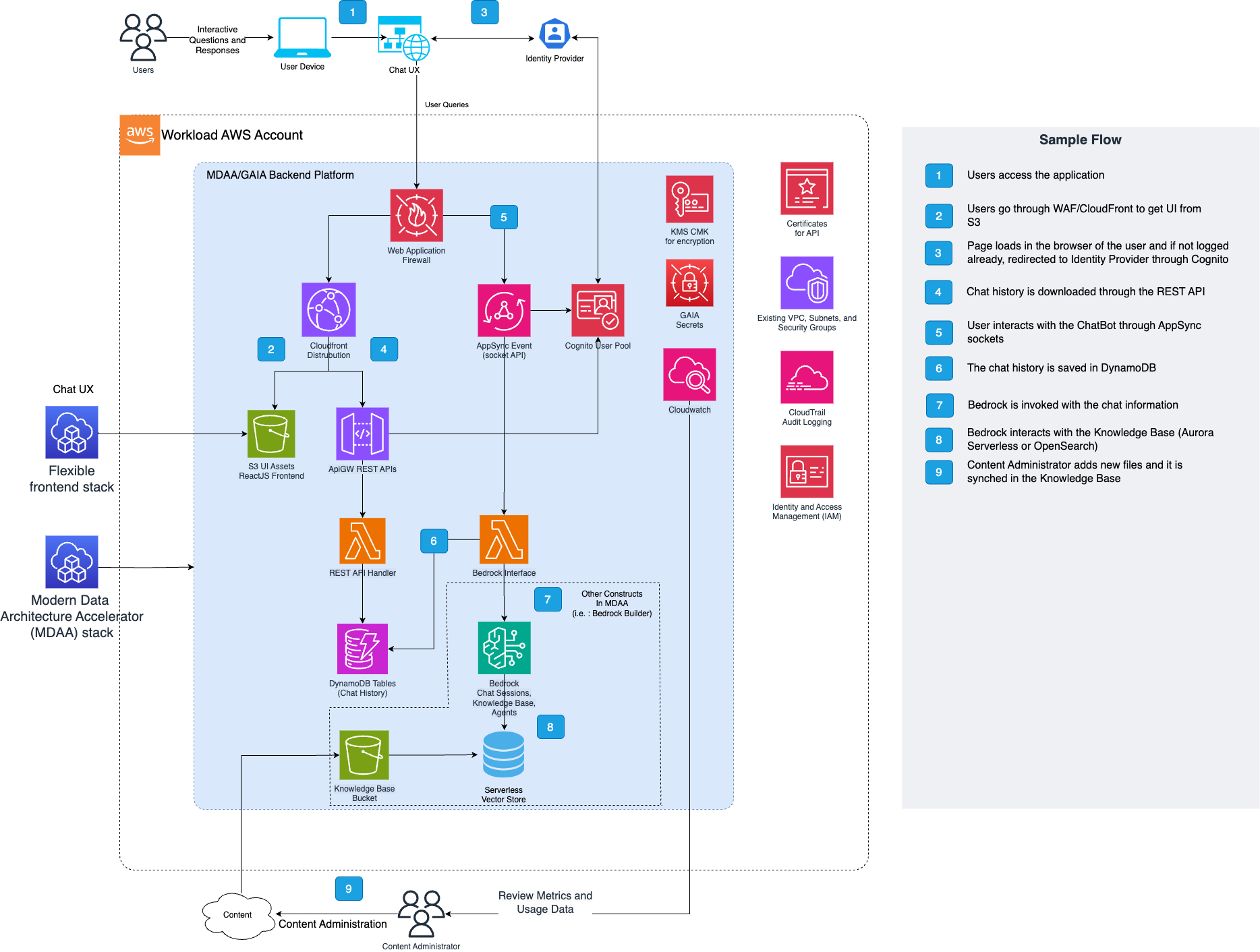
The GenAI Accelerator follows a modern, event-driven serverless architecture designed for scalability, security, and cost optimization. The system is built around three core interaction patterns: real-time chat via WebSocket, RESTful API operations, and asynchronous document processing.
Deployed Resources
Deployed Resources and Compliance Details
The GenAI Accelerator deploys a comprehensive set of AWS resources organized into logical categories. The following sections detail each component's purpose, functionality, and dependencies.
Core Components
These are the essential components deployed in every GenAI Accelerator installation:
API Infrastructure
- Amazon API Gateway (REST API) - RESTful API for CRUD operations for chat history and feedback collection.
- AWS AppSync Event API - GraphQL-based event API that orchestrates WebSocket message routing and real-time subscriptions between clients and AI model interfaces.
Authentication and Security
- Amazon Cognito User Pool - User authentication and management supporting multiple authentication flows including email/password, SAML federation with Active Directory, and integration with existing user pools.
- Amazon Cognito User Pool Client - Application client configuration for OAuth flows, callback URLs, and authentication settings.
- AWS KMS Customer Managed Key - Stack-wide encryption key for all data at rest and in transit with fine-grained access control policies.
- AWS Secrets - Secure storage for sensitive configuration including database credentials, API keys, and security tokens.
Data Storage
- Amazon DynamoDB - Sessions Table - Stores chat message history, and conversation metadata with configurable retention policies.
- Amazon DynamoDB - Feedback Table - Captures user feedback, ratings, and analytics data for AI responses.
Lambda Functions
- REST API Handler - Processes all REST API requests for chat history and feedback collection.
- WebSocket Connection Handler - Manages WebSocket connection lifecycle.
AI Model Integration
- Amazon Bedrock Integration - Native integration with foundation models available on Amazon Bedrock. See documentation for complete list of models available on Bedrock.
UI Hosting Infrastructure
- Client UI S3 Bucket & CloudFront Distribution - S3 bucket and CloudFront distribution provisioned for hosting a client-facing web application. No UI is included with MDAA; this infrastructure is ready for deployment of your own custom UI.
- Admin UI S3 Bucket & CloudFront Distribution - S3 bucket and CloudFront distribution provisioned for hosting an administrative dashboard. No UI is included with MDAA; this infrastructure is ready for deployment of your own custom UI.
Optional Components
These components are deployed based on configuration and feature requirements:
- Regional WAF - Protects API Gateway endpoints with configurable rules, CIDR-based access control, and DDoS protection. Can be skipped when using AWS Firewall Manager
- Global WAF - Protects CloudFront distributions with global threat intelligence and custom security rules. Can be skipped when using AWS Firewall Manager
- Service Interruption Management - DynamoDB table and REST API endpoints for managing planned maintenance and service interruptions.
WAF and Regional Deployment
The GenAI Accelerator deploys two WAF Web ACLs:
- Regional WAF - Protects API Gateway (deployed in your target region)
- Global WAF - Protects CloudFront distributions (must be deployed in us-east-1)
Deployment Options
Option 1: Deploy to us-east-1 (Simplest)
If you deploy to us-east-1, both WAFs are created automatically in the same stack. No additional configuration needed.
Option 2: Deploy to Another Region with Pre-Configured Cross-Region Stack
When deploying to a region other than us-east-1, MDAA will use a cross-region stack in us-east-1 for the Global WAF. This requires your MDAA configuration to have cross-region stacks pre-configured via additional_stacks in your module configuration:
# In mdaa.yaml, at the module level:
modules:
  gaia2:
    cdk_app: "@aws-mdaa/gaia-v2"
    additional_stacks:
      - region: 'us-east-1'  # Creates a cross-region stack for Global WAF
    app_configs:
      - ./gaia.yaml
For more details on additional_stacks configuration, see CONFIGURATION.md.
Note: CDK bootstrap must be established in us-east-1 for your account before deployment.
If cross-region stacks are not configured, deployment will fail with:
Error: CloudFront WAF requires a cross-region stack when your primary region is not us-east-1
(CloudFront WAF resources must be deployed in us-east-1).
Option 3: Bring Your Own Global WAF
Create a WAF Web ACL in us-east-1 manually and reference it in your configuration:
gaia:
  waf:
    skipGlobalDefaultWaf: true
    globalWafArn: "arn:aws:wafv2:us-east-1:123456789012:global/webacl/my-global-waf/a1b2c3d4-..."
To create a Global WAF via AWS CLI:
# Create IP Set for allowed CIDRs (us-east-1, CLOUDFRONT scope)
AWS_PAGER="" aws wafv2 create-ip-set \
  --name "gaia-global-ip-allowlist" \
  --scope CLOUDFRONT \
  --ip-address-version IPV4 \
  --addresses "203.0.113.0/24" "198.51.100.0/24" \
  --region us-east-1

# Note the IP Set ARN from the output, then create the Web ACL
AWS_PAGER="" aws wafv2 create-web-acl \
  --name "gaia-global-waf" \
  --scope CLOUDFRONT \
  --default-action Block={} \
  --visibility-config SampledRequestsEnabled=true,CloudWatchMetricsEnabled=true,MetricName=gaia-global-waf \
  --rules '[{
    "Name": "IPAllowList",
    "Priority": 0,
    "Statement": {
      "IPSetReferenceStatement": {
        "ARN": "<IP_SET_ARN_FROM_PREVIOUS_COMMAND>"
      }
    },
    "Action": { "Allow": {} },
    "VisibilityConfig": {
      "SampledRequestsEnabled": true,
      "CloudWatchMetricsEnabled": true,
      "MetricName": "IPAllowList"
    }
  }]' \
  --region us-east-1
Option 4: Skip Global WAF Entirely
If you're using AWS Firewall Manager or don't need CloudFront WAF protection:
Security note: With this configuration, your CloudFront distributions (client UI and admin UI) have no WAF protection. There is no IP allowlisting, rate limiting, or managed rule coverage at the CDN layer. Anyone on the internet can reach the login page and static assets. Cognito authentication still protects the application, but the attack surface is larger. AWS Shield Standard provides basic DDoS protection on CloudFront, but this is much coarser than WAF rules. For production deployments, prefer Option 1, 2, or 3.
Regional WAF Configuration
The Regional WAF (for API Gateway) is created in your deployment region by default. To use an existing WAF:
gaia:
  waf:
    skipRegionalDefaultWaf: true
    regionalWafArn: "arn:aws:wafv2:ca-central-1:123456789012:regional/webacl/my-regional-waf/..."
WAF IP Allowlist and NAT Gateway
If you use WAF with IP allowlisting (allowedCidrs), you must include your NAT Gateway's public IP address.
Lambda functions send WebSocket responses through AppSync, which is protected by WAF. The Lambda traffic appears to come from your NAT Gateway's public IP. If this IP is not in allowedCidrs, Lambda receives FORBIDDEN errors and chat responses never reach users.
Symptoms of misconfiguration:
- Chat messages send successfully but responses never arrive
- Lambda logs show FORBIDDEN errors when calling AppSync
- Users see messages "hang" indefinitely
Solution: Add your NAT Gateway IP to allowedCidrs:
# Find your NAT Gateway public IP
AWS_PAGER="" aws ec2 describe-nat-gateways \
  --query 'NatGateways[*].[NatGatewayId,NatGatewayAddresses[0].PublicIp]' \
  --output table
VPC and Networking Requirements
The GenAI Accelerator deploys Lambda functions inside your VPC. These functions need outbound internet access to reach AWS services including AppSync Events (for WebSocket responses).
Key requirement: Subnets must have a route to a NAT Gateway.
Note that connecting a function to a public subnet doesn't automatically give it an internet access. — AWS Lambda Documentation
Why NAT Gateway is Required
Lambda functions in a VPC use elastic network interfaces (ENIs) that do not receive public IP addresses. To reach the internet, Lambda traffic must route through a NAT Gateway.
The subnet's route table must have a route like 0.0.0.0/0 → nat-xxxxx for Lambda to have outbound internet access.
Additionally, AppSync Events does not have a VPC endpoint, so Lambda must reach it via the public internet. This makes NAT Gateway mandatory for GAIA v2.
AWS RAM Shared VPCs (Cross-Account)
If you're using AWS RAM to share a VPC from a network account to your workload account, you must specify the vpcOwnerAccountId in your configuration:
gaia:
  vpc:
    vpcId: "vpc-12345678"
    appSubnets:
      - "subnet-aaaaaaaa"
      - "subnet-bbbbbbbb"
    vpcOwnerAccountId: "222222222222"  # Network account that owns the VPC
Why is this needed?
When Lambda creates ENIs in shared subnets, the IAM policy condition ec2:Vpc must reference the VPC ARN with the network account ID (the account that owns the VPC), not the workload account ID. Without this setting, Lambda functions will fail to create network interfaces with an authorization error.
When to use: - Your VPC is shared via AWS RAM from a central network account - The subnets belong to a different AWS account than where GAIA is deployed
When NOT needed: - The VPC exists in the same account where GAIA is deployed - You're not using AWS RAM shared VPCs
Intended Network Architecture
┌─────────────────────────────────────────────────────────────┐
│ VPC                                                         │
│  ┌─────────────────────┐    ┌─────────────────────┐        │
│  │ Subnet (NAT GW)     │    │ Subnet (Lambda)     │        │
│  │  ┌───────────────┐  │    │  ┌───────────────┐  │        │
│  │  │ NAT Gateway   │◄─┼────┼──│ Lambda        │  │        │
│  │  └───────┬───────┘  │    │  └───────────────┘  │        │
│  └──────────┼──────────┘    └─────────────────────┘        │
│             │                Route: 0.0.0.0/0 → nat-xxx     │
└─────────────┼───────────────────────────────────────────────┘
              │
              ▼
         Internet Gateway → AWS Services (AppSync, Bedrock, etc.)
WebSocket Data Sources
The GenAI Accelerator supports multiple data source types for the WebSocket chat API. Each data source is implemented as a Lambda function that processes incoming messages and sends responses via AppSync Events.
Available Data Sources
| Data Source | Description | Use Case |
|---|---|---|
bedrockRagDataSource |
RAG with Bedrock Knowledge Base | Document Q&A with citations |
invokeModelDataSource |
Direct Bedrock model invocation | General chat, no KB needed |
customDataSource |
Bring your own Lambda | Custom processing logic |
bedrockRagDataSource
Uses Bedrock's RetrieveAndGenerate API to query a Knowledge Base and generate responses with source citations.
Features: - Retrieval-augmented generation with Knowledge Base - Inline citations and source attribution - Bedrock Guardrail integration - Custom prompt templates - Configurable inference parameters
Required Configuration:
| Property | Description |
|----------|-------------|
| modelId | Bedrock model ID for generation |
| lambdaRole | IAM role reference for Lambda execution |
Optional Configuration - RAG Settings:
| Property | Description |
|----------|-------------|
| guardrailId | Bedrock Guardrail ID for content safety |
| guardrailKmsKeyArn | KMS key ARN for Guardrail encryption |
| guardrailVersion | Guardrail version to use |
| displayInlineCitations | Show citation markers in responses (default: false) |
| kbNumberOfResults | Number of documents to retrieve from KB (1-100) |
| promptTemplate | Custom prompt for response generation |
Optional Configuration - Model Inference:
| Property | Description |
|----------|-------------|
| inferenceMaxTokens | Maximum tokens in response |
| inferenceTemperature | Randomness: 0=deterministic, 1=creative (0.0-1.0) |
| inferenceTopP | Nucleus sampling threshold (0.0-1.0) |
Optional Configuration - Orchestration (Advanced RAG):
| Property | Description |
|----------|-------------|
| orchestrationPromptTemplate | Custom prompt for query transformation |
| orchestrationInferenceMaxTokens | Max tokens for orchestration inference |
| orchestrationInferenceTemperature | Temperature for orchestration (0.0-1.0) |
| orchestrationInferenceTopP | Top-p for orchestration (0.0-1.0) |
| orchestrationInferenceStopSequences | Stop sequences for orchestration |
| orchestrationPerformanceLatency | Performance vs latency (standard or optimized) |
| orchestrationQueryTransformationType | Query transformation type (e.g., QUERY_DECOMPOSITION) |
Optional Configuration - Lambda Settings:
| Property | Description |
|----------|-------------|
| lambdaArchitecture | ARM_64 or X86_64 (default: X86_64) |
| pythonRuntime | Python runtime version (default: Python 3.14) |
| lambdaTimeoutInSeconds | Lambda timeout (default: 600s) |
| lambdaMemorySize | Lambda memory in MB (default: 1024) |
| provisionedConcurrentExecutions | Pre-warmed Lambda instances |
| reservedConcurrentExecutions | Reserved concurrent executions |
invokeModelDataSource
Direct invocation of Bedrock foundation models via invokeModelWithResponseStream. Simpler configuration when RAG is not needed.
Features: - Streaming responses from Bedrock models - No Knowledge Base required - Lower latency (no retrieval step) - Service interruption awareness
Required Configuration:
| Property | Description |
|----------|-------------|
| modelId | Bedrock model ID (e.g., anthropic.claude-3-sonnet-20240229-v1:0) |
| lambdaRole | IAM role reference for Lambda execution |
Optional Configuration - Lambda Settings:
| Property | Description |
|----------|-------------|
| lambdaArchitecture | ARM_64 or X86_64 (default: X86_64) |
| pythonRuntime | Python runtime version (default: Python 3.14) |
| lambdaTimeoutInSeconds | Lambda timeout (default: 600s) |
| lambdaMemorySize | Lambda memory in MB (default: 1024) |
| provisionedConcurrentExecutions | Pre-warmed Lambda instances |
| reservedConcurrentExecutions | Reserved concurrent executions |
customDataSource
Allows integration of a custom Lambda function for complete control over message processing.
Required Configuration:
| Property | Description |
|----------|-------------|
| lambdaArn | ARN of your custom Lambda function |
REST API Reference
All REST API endpoints are served under the /v1 prefix and require Cognito authentication.
Direct API Gateway Access
By default, the REST API requires requests to come through CloudFront, which adds an X-Origin-Verify header for origin verification. This provides defense-in-depth security.
To allow direct API Gateway access (bypassing CloudFront), set the Lambda environment variable:
When disabled: - Requests can be made directly to the API Gateway endpoint - Authentication still relies on the Cognito authorizer (primary auth mechanism) - Useful for testing, internal integrations, or architectures without CloudFront
When enabled (default):
- Requests must include the correct X-Origin-Verify header (added by CloudFront)
- Requests bypassing CloudFront receive a 403 Forbidden response
Sessions API
The Sessions API manages chat conversation history. Each session represents a conversation thread with the AI, storing the full message history for context continuity. Sessions are automatically created when users start chatting and can be retrieved to resume conversations or review past interactions.
| Method | Endpoint | Description | Auth |
|---|---|---|---|
GET |
/v1/sessions |
List all sessions for the current user | User |
GET |
/v1/sessions/<session_id> |
Get a specific session with full chat history | User |
DELETE |
/v1/sessions |
Delete all sessions for the current user | User |
DELETE |
/v1/sessions/<session_id> |
Delete a specific session | User |
GET |
/v1/admin/sessions |
List all sessions across all users (paginated) | Admin |
GET |
/v1/users/<user_id>/sessions |
List all sessions for a specific user | Admin |
GET |
/v1/users/<user_id>/sessions/<session_id> |
Get a specific session for any user | Admin |
Session list response:
Session detail response (includes full chat history):
{
  "id": "session-uuid",
  "title": "First message from user...",
  "dateModified": 1703894400,
  "userId": "user-sub",
  "history": [
    {
      "id": "message-uuid",
      "role": "user",
      "content": "What is Amazon S3?"
    },
    {
      "id": "message-uuid",
      "role": "assistant",
      "content": "Amazon S3 is...",
      "parts": [
        {
          "type": "text",
          "text": "Amazon S3 is...",
          "citationSpans": [{"span": {...}, "refIndex": 0}]
        },
        {
          "type": "source",
          "documents": [{"title": "...", "uri": "s3://...", "excerpt": "..."}]
        }
      ],
      "metadata": {
        "modelId": "anthropic.claude-3-sonnet-20240229-v1:0",
        "responseTimeMs": 1523
      }
    }
  ]
}
History message fields:
- parts (assistant messages only): Rich content array for RAG responses
- type: "text": Contains the response text and citationSpans for inline citation positions
- type: "source": Contains retrieved documents with title, URI, and excerpt
- metadata (assistant messages only): Response metadata including modelId and responseTimeMs
Pagination
Paginated endpoints (GET /v1/admin/sessions, GET /v1/feedback, GET /v1/admin/feedback) accept a limit query parameter and, when more results are available, return a next_token in the response body:
To fetch the next page, pass the value back unchanged as the next_token query parameter. The token is opaque and versioned (the v1. prefix identifies the format): it is an encrypted, integrity-protected encoding of the server's internal pagination cursor. Clients must treat it as a meaningless string — do not decode, construct, or modify it. A token that has been tampered with, or one issued for a different endpoint or user, is rejected with 400 Invalid next_token. Tokens are not guaranteed to remain valid across service deployments.
Feedback API
The Feedback API enables collecting user ratings on AI responses for quality monitoring and improvement. Users can submit thumbs up/down ratings with configurable reasons (e.g., "accuracy", "unhelpful") and optional free-text feedback. This data can be used for analytics dashboards, model fine-tuning decisions, and compliance auditing.
Configure available feedback reasons in your gaia.yaml:
| Method | Endpoint | Description | Auth |
|---|---|---|---|
POST |
/v1/feedback |
Submit feedback for an AI response | User |
GET |
/v1/feedback |
Get current user's feedback history (paginated) | User |
GET |
/v1/feedback/<feedback_id> |
Get a specific feedback entry | User/Admin |
GET |
/v1/admin/feedback |
Get all feedback in a date range (paginated) | Admin |
Feedback payload:
{
  "session_id": "uuid",
  "message_id": "uuid",
  "rating": "thumbs_up | thumbs_down",
  "reason": "accuracy",
  "text_feedback": "Optional detailed feedback"
}
Bot Management API (Optional)
Admin-only endpoints for managing service interruptions. Requires SERVICE_INTERRUPTION_TABLE_NAME to be configured.
| Method | Endpoint | Description | Auth |
|---|---|---|---|
POST |
/v1/bot-management/interruptions |
Activate a service interruption | Admin |
GET |
/v1/bot-management/interruptions |
Get status of all service interruptions | Admin |
GET |
/v1/bot-management/interruptions/<service_type> |
Get status of a specific service interruption | Admin |
DELETE |
/v1/bot-management/interruptions/<service_type> |
Deactivate a service interruption | Admin |
GET |
/v1/bot-management/service-types |
List available service types | Admin |
GET |
/v1/bot-management/health |
Health check for bot management | Admin |
Valid service types: global, bedrock-rag, bedrock-invoke-model, bedrock-strands-agents
WebSocket API Reference (AppSync Events)
The GenAI Accelerator uses AWS AppSync Events for real-time chat communication. Clients connect via WebSocket to send messages and receive streaming AI responses.
Connection
Connect to the AppSync Events endpoint using the WebSocket URL from your deployment outputs. Authentication is via Cognito JWT token in the Authorization header.
Channel Structure
Channels follow the pattern /namespace/{userId}/{sessionId}:
| Namespace | Purpose |
|---|---|
/in/{userId}/{sessionId} |
Client publishes messages to this channel (ingress) |
/out/{userId}/{sessionId} |
Client subscribes to this channel to receive responses (egress) |
Users can only subscribe to channels matching their own userId (enforced by the sub claim in the JWT).
Sending Messages (Publish to /in)
Publish a message to start a chat interaction:
{
  "payload": {
    "text": "What is Amazon S3?",
    "sessionId": "550e8400-e29b-41d4-a716-446655440000"
  }
}
| Field | Type | Required | Description |
|---|---|---|---|
text |
string | Yes | The user's message/question |
sessionId |
string | Yes | UUID identifying the chat session |
Receiving Messages (Subscribe to /out)
Subscribe to the /out/{userId}/{sessionId} channel to receive streaming responses. Messages arrive as events with the following structure:
Message Types
textDelta - Streaming Text Chunk
Sent incrementally as the AI generates its response. Collect and concatenate these to build the full response.
{
  "id": "abc123",
  "content": {
    "type": "textDelta",
    "sequenceNumber": 0,
    "text": "Amazon S3 is "
  }
}
| Field | Description |
|---|---|
type |
Always "textDelta" |
sequenceNumber |
Incrementing number for ordering chunks |
text |
The text fragment for this chunk |
When textDelta messages stop arriving, the response is complete. There is no explicit "end" message for text streaming.
citationEvent - Inline Citation Marker (RAG only)
Sent when inline citations are enabled (displayInlineCitations: true). Indicates where a citation should be inserted in the response text.
{
  "id": "abc123",
  "content": {
    "type": "citationEvent",
    "sequenceNumber": 5,
    "position": 142,
    "citationNumber": 1,
    "citationText": "relevant excerpt from source",
    "documentIndex": 0
  }
}
| Field | Description |
|---|---|
position |
Character position in the response where citation applies |
citationNumber |
Display number for the citation (1-indexed) |
citationText |
The text span this citation covers |
documentIndex |
Index into the source documents array |
source - Retrieved Documents (RAG only)
Sent after text streaming completes. Contains the source documents used for RAG responses.
{
  "id": "abc123",
  "content": {
    "type": "source",
    "documents": [
      {
        "title": "Document Title",
        "uri": "s3://bucket/path/to/doc.pdf",
        "excerpt": "Relevant excerpt from the document..."
      }
    ]
  }
}
error - Error Response
Sent when an error occurs during processing.
{
  "type": "text",
  "action": "error",
  "id": "error-uuid",
  "connectionId": "session-id",
  "userId": "user-id",
  "timestamp": 1703894400,
  "data": {
    "sessionId": "session-id",
    "content": "Error message describing what went wrong",
    "type": "text"
  }
}
Typical Message Flow
- Client publishes message to
/in/{userId}/{sessionId} - Client receives multiple
textDeltamessages (streaming response) - Client receives
citationEventmessages (if RAG with inline citations) - Client receives
sourcemessage with documents (if RAG) - Streaming is complete when messages stop arriving
Service Interruptions
When a service interruption is active, the response will be a single textDelta containing the interruption message instead of an AI-generated response.